🔐 HashiCorp Vault – Complete End-to-End Tutorial
1️⃣ What Problem Vault Solves (Why You Need It)
Without Vault:
- Secrets in
.envfiles - Secrets hardcoded in code
- Secrets stored in GitHub Actions / CI
- Long-lived DB passwords
- Manual rotation ❌
With Vault:
- Central secret store
- Fine-grained access control
- Short-lived (dynamic) credentials
- Automatic rotation
- Auditing
👉 Vault = single source of truth for secrets
2️⃣ Vault Core Concepts (Very Important)
| Concept | Explanation |
|---|---|
| Secret | Password, token, API key |
| Secret Engine | How secrets are stored or generated |
| Auth Method | How users/apps authenticate |
| Policy | What access is allowed |
| Token | Temporary access credential |
| Seal | Protects master encryption key |
| Unseal | Unlocks Vault |
| Lease | Expiry time of a secret |
3️⃣ Vault Architecture (How It Works)
High-Level Architecture
┌─────────────────────────────────────────────────────────────┐
│                     HashiCorp Vault                         │
│                                                             │
│  ┌──────────────────────────────────────────────────────┐  │
│  │              HTTP/HTTPS API Layer                    │  │
│  │         (Port 8200 - Client Interface)               │  │
│  └──────────────────────────────────────────────────────┘  │
│                          ▼                                  │
│  ┌──────────────────────────────────────────────────────┐  │
│  │           Authentication Methods                     │  │
│  │  ┌──────┐  ┌──────┐  ┌──────┐  ┌──────┐  ┌──────┐  │  │
│  │  │Token │  │AppRole│ │K8s   │  │LDAP  │  │AWS   │  │  │
│  │  │Auth  │  │Auth  │  │Auth  │  │Auth  │  │Auth  │  │  │
│  │  └──────┘  └──────┘  └──────┘  └──────┘  └──────┘  │  │
│  └──────────────────────────────────────────────────────┘  │
│                          ▼                                  │
│  ┌──────────────────────────────────────────────────────┐  │
│  │              Policy Engine                           │  │
│  │         (ACL - Access Control Logic)                 │  │
│  └──────────────────────────────────────────────────────┘  │
│                          ▼                                  │
│  ┌──────────────────────────────────────────────────────┐  │
│  │              Secrets Engines                         │  │
│  │  ┌──────┐  ┌──────┐  ┌──────┐  ┌──────┐  ┌──────┐  │  │
│  │  │ KV   │  │Database│ │AWS  │  │Transit│ │PKI   │  │  │
│  │  │(v1/v2)│ │Dynamic│  │Dynamic│ │Encrypt│ │Certs │  │  │
│  │  └──────┘  └──────┘  └──────┘  └──────┘  └──────┘  │  │
│  └──────────────────────────────────────────────────────┘  │
│                          ▼                                  │
│  ┌──────────────────────────────────────────────────────┐  │
│  │           Storage Backend (Encrypted)                │  │
│  │    ┌────────┐  ┌────────┐  ┌────────┐  ┌────────┐  │  │
│  │    │Consul  │  │etcd    │  │S3      │  │File    │  │  │
│  │    └────────┘  └────────┘  └────────┘  └────────┘  │  │
│  └──────────────────────────────────────────────────────┘  │
│                                                             │
│  ┌──────────────────────────────────────────────────────┐  │
│  │              Audit Devices                           │  │
│  │         (Logs all requests/responses)                │  │
│  └──────────────────────────────────────────────────────┘  │
└─────────────────────────────────────────────────────────────┘
Vault Core Components
┌─────────────────────────────────────────────────────────────┐
│                    Vault Server                             │
│                                                             │
│  ┌───────────────────────────────────────────────────────┐ │
│  │  Barrier (Encryption Layer)                           │ │
│  │  • All data encrypted at rest                         │ │
│  │  • Master key protected by seal                       │ │
│  │  • AES-256-GCM encryption                             │ │
│  └───────────────────────────────────────────────────────┘ │
│                          ▲                                  │
│                          │                                  │
│  ┌───────────────────────┴───────────────────────────────┐ │
│  │  Seal/Unseal Mechanism                                │ │
│  │  ┌─────────────┐  ┌─────────────┐  ┌─────────────┐  │ │
│  │  │ Shamir Seal │  │  Auto Unseal │  │ Cloud KMS   │  │ │
│  │  │ (5 keys,    │  │  (AWS/Azure/ │  │ Integration │  │ │
│  │  │  3 needed)  │  │   GCP KMS)   │  │             │  │ │
│  │  └─────────────┘  └─────────────┘  └─────────────┘  │ │
│  └───────────────────────────────────────────────────────┘ │
│                                                             │
│  ┌───────────────────────────────────────────────────────┐ │
│  │  Token Store                                          │ │
│  │  • Token lifecycle management                         │ │
│  │  • TTL (Time To Live)                                 │ │
│  │  • Renewal & Revocation                               │ │
│  └───────────────────────────────────────────────────────┘ │
└─────────────────────────────────────────────────────────────┘
Request Flow Architecture
┌──────────────┐
│   Client     │
│ (App/User)   │
└──────┬───────┘
       │ 1. Request with Token
       ▼
┌──────────────────────────────────────────────────────────┐
│                    Vault Server                          │
│                                                          │
│  ┌────────────────────────────────────────────────────┐ │
│  │ Step 1: Token Validation                           │ │
│  │ • Verify token exists                              │ │
│  │ • Check token TTL                                  │ │
│  │ • Validate token not revoked                       │ │
│  └────────────────────────────────────────────────────┘ │
│                       ▼                                  │
│  ┌────────────────────────────────────────────────────┐ │
│  │ Step 2: Policy Evaluation                          │ │
│  │ • Load policies attached to token                  │ │
│  │ • Check path permissions                           │ │
│  │ • Verify capabilities (read/write/delete)          │ │
│  └────────────────────────────────────────────────────┘ │
│                       ▼                                  │
│  ┌────────────────────────────────────────────────────┐ │
│  │ Step 3: Route to Secrets Engine                    │ │
│  │ • Identify target secrets engine                   │ │
│  │ • Execute engine-specific logic                    │ │
│  │ • Generate or retrieve secret                      │ │
│  └────────────────────────────────────────────────────┘ │
│                       ▼                                  │
│  ┌────────────────────────────────────────────────────┐ │
│  │ Step 4: Lease Management                           │ │
│  │ • Assign TTL to secret                             │ │
│  │ • Create lease ID                                  │ │
│  │ • Schedule auto-revocation                         │ │
│  └────────────────────────────────────────────────────┘ │
│                       ▼                                  │
│  ┌────────────────────────────────────────────────────┐ │
│  │ Step 5: Audit Logging                              │ │
│  │ • Log request details                              │ │
│  │ • Log response (secrets redacted)                  │ │
│  │ • Write to audit devices                           │ │
│  └────────────────────────────────────────────────────┘ │
└──────────────────────────────────────────────────────────┘
       │ 6. Return Secret + Lease
       ▼
┌──────────────┐
│   Client     │
│ (Receives    │
│  Secret)     │
└──────────────┘
Authentication Flow (AppRole Example)
┌─────────────┐                                    ┌──────────────┐
│ Application │                                    │    Vault     │
└──────┬──────┘                                    └──────┬───────┘
       │                                                  │
       │ 1. Request Role ID                              │
       │ ─────────────────────────────────────────────▶  │
       │                                                  │
       │ 2. Return Role ID                               │
       │ ◀─────────────────────────────────────────────  │
       │                                                  │
       │ 3. Request Secret ID (from secure location)     │
       │ ─────────────────────────────────────────────▶  │
       │                                                  │
       │ 4. Return Secret ID (one-time use)              │
       │ ◀─────────────────────────────────────────────  │
       │                                                  │
       │ 5. Login with Role ID + Secret ID               │
       │ ─────────────────────────────────────────────▶  │
       │    POST /auth/approle/login                     │
       │    { role_id: "xxx", secret_id: "yyy" }         │
       │                                                  │
       │                                    ┌──────────┐ │
       │                                    │ Validate │ │
       │                                    │ Credentials│
       │                                    └──────────┘ │
       │                                                  │
       │ 6. Return Client Token + TTL                    │
       │ ◀─────────────────────────────────────────────  │
       │    { client_token: "s.xxx", ttl: 3600 }         │
       │                                                  │
       │ 7. Request Secret with Token                    │
       │ ─────────────────────────────────────────────▶  │
       │    GET /secret/data/myapp                       │
       │    X-Vault-Token: s.xxx                         │
       │                                                  │
       │ 8. Return Secret + Lease                        │
       │ ◀─────────────────────────────────────────────  │
       │    { data: {...}, lease_duration: 3600 }        │
       │                                                  │
Seal/Unseal Process
┌─────────────────────────────────────────────────────────────┐
│                    Vault Initialization                     │
└─────────────────────────────────────────────────────────────┘
                            │
                            ▼
┌─────────────────────────────────────────────────────────────┐
│  Generate Master Key (256-bit)                              │
│  • Used to encrypt all data                                 │
│  • Never stored in plaintext                                │
└─────────────────────────────────────────────────────────────┘
                            │
                            ▼
┌─────────────────────────────────────────────────────────────┐
│  Shamir's Secret Sharing                                    │
│  • Split master key into 5 shares                           │
│  • Require 3 shares to reconstruct (threshold)              │
│  • Each share useless alone                                 │
└─────────────────────────────────────────────────────────────┘
                            │
                            ▼
┌─────────────────────────────────────────────────────────────┐
│  Vault State: SEALED                                        │
│  • Cannot read/write secrets                                │
│  • Master key not in memory                                 │
│  • Storage backend encrypted                                │
└─────────────────────────────────────────────────────────────┘
                            │
                            ▼
┌─────────────────────────────────────────────────────────────┐
│  Unseal Process (Manual)                                    │
│  1. Operator provides unseal key 1                          │
│  2. Operator provides unseal key 2                          │
│  3. Operator provides unseal key 3                          │
│  → Master key reconstructed in memory                       │
└─────────────────────────────────────────────────────────────┘
                            │
                            ▼
┌─────────────────────────────────────────────────────────────┐
│  Vault State: UNSEALED                                      │
│  • Can decrypt storage backend                              │
│  • Can process requests                                     │
│  • Master key in memory (encrypted)                         │
└─────────────────────────────────────────────────────────────┘

Alternative: Auto-Unseal with Cloud KMS
┌─────────────────────────────────────────────────────────────┐
│  Auto-Unseal (Production)                                   │
│  • Master key encrypted by AWS KMS / Azure Key Vault        │
│  • Vault automatically unseals on restart                   │
│  • No manual intervention needed                            │
│  • More secure (no key distribution)                        │
└─────────────────────────────────────────────────────────────┘
Dynamic Secrets Architecture
┌──────────────┐                                    ┌──────────────┐
│ Application  │                                    │    Vault     │
└──────┬───────┘                                    └──────┬───────┘
       │                                                   │
       │ 1. Request DB Credentials                        │
       │ ──────────────────────────────────────────────▶  │
       │    GET /database/creds/my-role                   │
       │                                                   │
       │                                    ┌────────────┐│
       │                                    │ Generate   ││
       │                                    │ Unique     ││
       │                                    │ Username   ││
       │                                    │ & Password ││
       │                                    └────────────┘│
       │                                                   │
       │                                    ┌────────────┐│
       │                                    │ Create DB  ││
       │                                    │ User with  ││
       │                                    │ Permissions││
       │                                    └────────────┘│
       │                                                   │
       │ 2. Return Credentials + Lease (TTL: 1h)          │
       │ ◀──────────────────────────────────────────────  │
       │    { username: "v-app-abc123",                   │
       │      password: "xyz789",                         │
       │      lease_duration: 3600 }                      │
       │                                                   │
       │ 3. Use Credentials                               │
       │ ──────────────────────────────────────────────▶  │
       │                                          ┌───────┴────────┐
       │                                          │   Database     │
       │                                          │   (PostgreSQL, │
       │                                          │    MySQL, etc) │
       │                                          └────────────────┘
       │                                                   │
       │ [After 1 hour - Lease Expires]                   │
       │                                                   │
       │                                    ┌────────────┐│
       │                                    │ Revoke     ││
       │                                    │ Lease      ││
       │                                    └────────────┘│
       │                                                   │
       │                                    ┌────────────┐│
       │                                    │ Delete DB  ││
       │                                    │ User       ││
       │                                    └────────────┘│
       │                                                   │
High Availability Architecture
┌─────────────────────────────────────────────────────────────┐
│                  Load Balancer / Proxy                      │
│                  (HAProxy / NGINX)                          │
└────────────┬──────────────┬──────────────┬─────────────────┘
             │              │              │
             ▼              ▼              ▼
    ┌────────────┐  ┌────────────┐  ┌────────────┐
    │  Vault     │  │  Vault     │  │  Vault     │
    │  Node 1    │  │  Node 2    │  │  Node 3    │
    │  (Active)  │  │ (Standby)  │  │ (Standby)  │
    └─────┬──────┘  └─────┬──────┘  └─────┬──────┘
          │               │               │
          │    ┌──────────┴──────────┐    │
          │    │                     │    │
          ▼    ▼                     ▼    ▼
    ┌─────────────────────────────────────────┐
    │      Shared Storage Backend             │
    │      (Consul / etcd / Raft)             │
    │                                         │
    │  • Stores encrypted data                │
    │  • Handles leader election              │
    │  • Replicates across nodes              │
    └─────────────────────────────────────────┘

Active Node:
  • Handles all read/write requests
  • Unsealed and operational
  • Holds active token in memory

Standby Nodes:
  • Sealed state
  • Forward requests to active node
  • Promote to active if leader fails
Vault in Kubernetes Architecture
┌─────────────────────────────────────────────────────────────┐
│                  Kubernetes Cluster                         │
│                                                             │
│  ┌───────────────────────────────────────────────────────┐ │
│  │  Application Pod                                      │ │
│  │  ┌─────────────────────────────────────────────────┐ │ │
│  │  │  Init Container (Vault Agent)                   │ │ │
│  │  │  1. Authenticate with K8s ServiceAccount        │ │ │
│  │  │  2. Get Vault token                             │ │ │
│  │  │  3. Fetch secrets                               │ │ │
│  │  │  4. Write to shared volume                      │ │ │
│  │  └─────────────────────────────────────────────────┘ │ │
│  │                       ▼                               │ │
│  │  ┌─────────────────────────────────────────────────┐ │ │
│  │  │  Application Container                          │ │ │
│  │  │  • Reads secrets from volume                    │ │ │
│  │  │  • Or uses injected env vars                    │ │ │
│  │  └─────────────────────────────────────────────────┘ │ │
│  │                                                       │ │
│  │  ┌─────────────────────────────────────────────────┐ │ │
│  │  │  Sidecar Container (Vault Agent - Optional)     │ │ │
│  │  │  • Keeps secrets updated                        │ │ │
│  │  │  • Handles token renewal                        │ │ │
│  │  └─────────────────────────────────────────────────┘ │ │
│  └───────────────────────────────────────────────────────┘ │
│                       │                                     │
│                       │ K8s Auth                            │
│                       ▼                                     │
│  ┌───────────────────────────────────────────────────────┐ │
│  │  Vault Server (External or In-Cluster)               │ │
│  │  • Validates K8s ServiceAccount JWT                  │ │
│  │  • Returns Vault token                               │ │
│  │  • Provides secrets based on policy                  │ │
│  └───────────────────────────────────────────────────────┘ │
└─────────────────────────────────────────────────────────────┘
Complete System Design
┌─────────────────────────────────────────────────────────────────────────┐
│                         Production Environment                          │
│                                                                         │
│  ┌──────────────┐         ┌──────────────┐         ┌──────────────┐   │
│  │   Frontend   │         │   Backend    │         │  Microservice│   │
│  │   (React)    │────────▶│   (Node.js)  │────────▶│   (Go/Java)  │   │
│  └──────────────┘         └──────┬───────┘         └──────┬───────┘   │
│                                   │                        │           │
│                                   │ AppRole Auth           │ K8s Auth  │
│                                   ▼                        ▼           │
│  ┌─────────────────────────────────────────────────────────────────┐  │
│  │                      HashiCorp Vault Cluster                    │  │
│  │  ┌──────────┐      ┌──────────┐      ┌──────────┐             │  │
│  │  │ Active   │◀────▶│ Standby  │◀────▶│ Standby  │             │  │
│  │  │  Node    │      │  Node    │      │  Node    │             │  │
│  │  └────┬─────┘      └────┬─────┘      └────┬─────┘             │  │
│  │       │                 │                 │                     │  │
│  │       └─────────────────┴─────────────────┘                     │  │
│  │                         │                                        │  │
│  │                         ▼                                        │  │
│  │              ┌──────────────────────┐                           │  │
│  │              │  Consul (Storage)    │                           │  │
│  │              │  • HA Storage        │                           │  │
│  │              │  • Leader Election   │                           │  │
│  │              └──────────────────────┘                           │  │
│  └─────────────────────────────────────────────────────────────────┘  │
│                                   │                                    │
│                                   │ Dynamic Secrets                    │
│                                   ▼                                    │
│  ┌─────────────────────────────────────────────────────────────────┐  │
│  │                    External Services                            │  │
│  │  ┌──────────┐  ┌──────────┐  ┌──────────┐  ┌──────────┐       │  │
│  │  │PostgreSQL│  │  MySQL   │  │   AWS    │  │  Azure   │       │  │
│  │  │ Database │  │ Database │  │   IAM    │  │   AD     │       │  │
│  │  └──────────┘  └──────────┘  └──────────┘  └──────────┘       │  │
│  └─────────────────────────────────────────────────────────────────┘  │
│                                                                         │
│  ┌─────────────────────────────────────────────────────────────────┐  │
│  │                    Monitoring & Audit                           │  │
│  │  ┌──────────┐  ┌──────────┐  ┌──────────┐                      │  │
│  │  │Prometheus│  │ Grafana  │  │  Splunk  │                      │  │
│  │  │ Metrics  │  │Dashboard │  │Audit Logs│                      │  │
│  │  └──────────┘  └──────────┘  └──────────┘                      │  │
│  └─────────────────────────────────────────────────────────────────┘  │
└─────────────────────────────────────────────────────────────────────────┘
Flow
- Client authenticates (AppRole/K8s/Token)
- Vault validates credentials
- Vault checks policy (ACL)
- Vault returns secret with lease
- Secret auto-expires after TTL
- All actions logged to audit devices
4️⃣ Install Vault (Linux – Recommended)
sudo apt update
sudo apt install -y unzip wget

wget https://releases.hashicorp.com/vault/1.15.5/vault_1.15.5_linux_amd64.zip
unzip vault_1.15.5_linux_amd64.zip
sudo mv vault /usr/local/bin/

vault version
5️⃣ Run Vault (Development Mode – Learning)
Vault prints:
- Root token
- Address (
127.0.0.1:8200)
Set env vars:
Check:
6️⃣ Vault UI
Open:
Login with root token
7️⃣ Secrets Engine – KV (Most Used)
Enable KV v2
Store Secret
Read Secret
Read Single Value
8️⃣ Policies (Access Control)
Create Policy File
Apply Policy
9️⃣ Authentication Methods
🔑 A. Userpass (Human Login)
Create user:
Login:
🔑 B. Token Auth (CI/CD)
Used in:
- GitHub Actions
- Jenkins
- GitLab CI
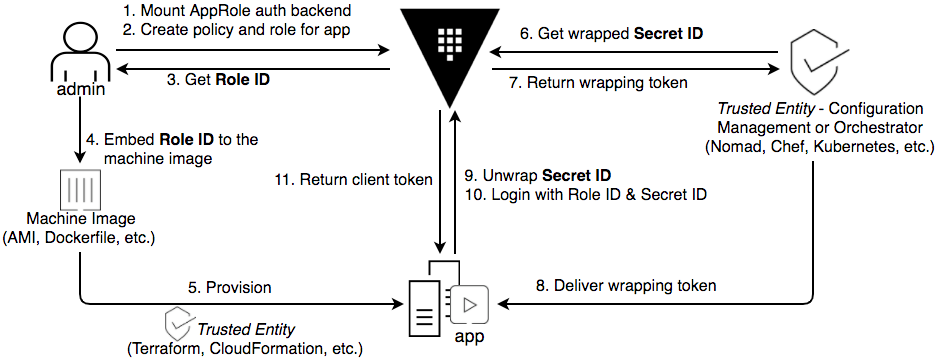
🔑 C. AppRole (Best for Backend Apps)
✔ Secure ✔ Machine-to-machine ✔ Industry standard
Enable:
Create role:
Get Role ID:
Get Secret ID:
Login using AppRole:
🔁 How Backend Uses Vault (Real Flow)

10️⃣ Vault in Node.js Backend (Real Example)
import vault from "node-vault";

const client = vault({
  endpoint: "http://127.0.0.1:8200",
  token: process.env.VAULT_TOKEN,
});

const secret = await client.read("secret/data/db");
console.log(secret.data.data.password);
11️⃣ Dynamic Secrets (Power Feature)
Instead of storing DB passwords 👇
Enable DB Engine
Vault creates:
- Temporary DB users
- Auto-expired credentials
✔ No hardcoded passwords ✔ Auto rotation ✔ Least privilege
12️⃣ Vault Encryption (Transit Engine)
Encrypt:
Decrypt:
13️⃣ Vault Audit Logs (Security)
Tracks:
- Who accessed what
- When
- From where
14️⃣ Vault Initialization (Production)
Outputs:
- 5 unseal keys
- Root token
Unseal Vault
(Enter 3 different keys)
15️⃣ Auto-Unseal (Production MUST)
Use:
- AWS KMS
- Azure Key Vault
- GCP KMS
No manual unseal after restart.
16️⃣ Vault systemd Service
[Unit]
Description=Vault
After=network.target

[Service]
ExecStart=/usr/local/bin/vault server -config=/etc/vault/config.hcl
Restart=always
User=vault
Group=vault

[Install]
WantedBy=multi-user.target
17️⃣ Vault with Docker
18️⃣ Vault with Kubernetes (Industry Standard)
- Kubernetes Auth
- Pod ServiceAccount → Vault
- Secrets injected as env or file
Used by microservices in prod
19️⃣ Best Practices (Real World)
✅ Never use root token ✅ Always use AppRole / K8s auth ✅ Short TTL tokens ✅ Enable audit logs ✅ Use HTTPS ✅ Auto-unseal enabled ✅ One policy per app
20️⃣ When NOT to Use Vault
❌ Small hobby app ❌ Only 1–2 secrets ❌ No security requirement
🔥 Real Production Stack Example
Frontend → API
Backend → Vault (AppRole)
Vault → DB / API Keys
CI/CD → Vault Token
K8s → Vault Agent