
1️⃣ Why Object Storage for Loki?
By default, Loki uses local filesystem ❌
This is NOT production-safe.
Problems with local storage
-
Logs lost on restart
-
No scalability
-
No HA
-
Disk fills quickly
Object storage solves
✔ Durability
✔ Cheap long-term storage
✔ Horizontal scaling
✔ HA Loki setups
2️⃣ Supported Object Storage (Official)
| Provider | Status |
|---|---|
| AWS S3 | ✅ Best supported |
| Azure Blob Storage | ✅ |
| Google Cloud Storage | ✅ |
| DigitalOcean Spaces | ✅ (S3 compatible) |
| MinIO | ✅ |
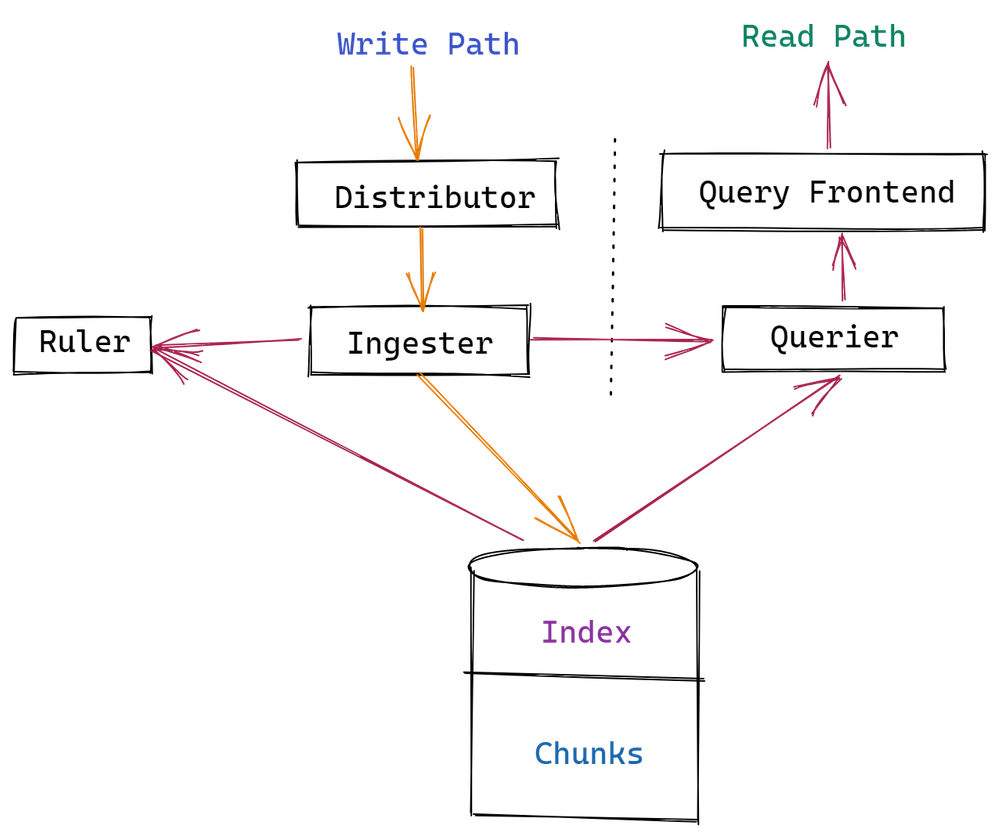
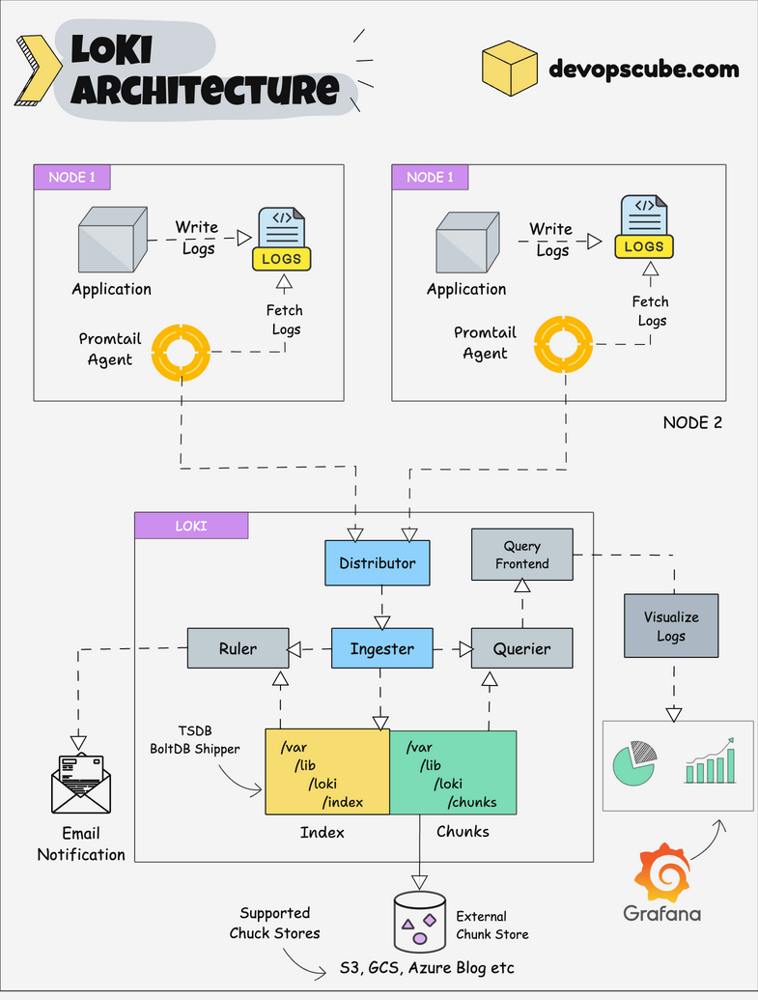
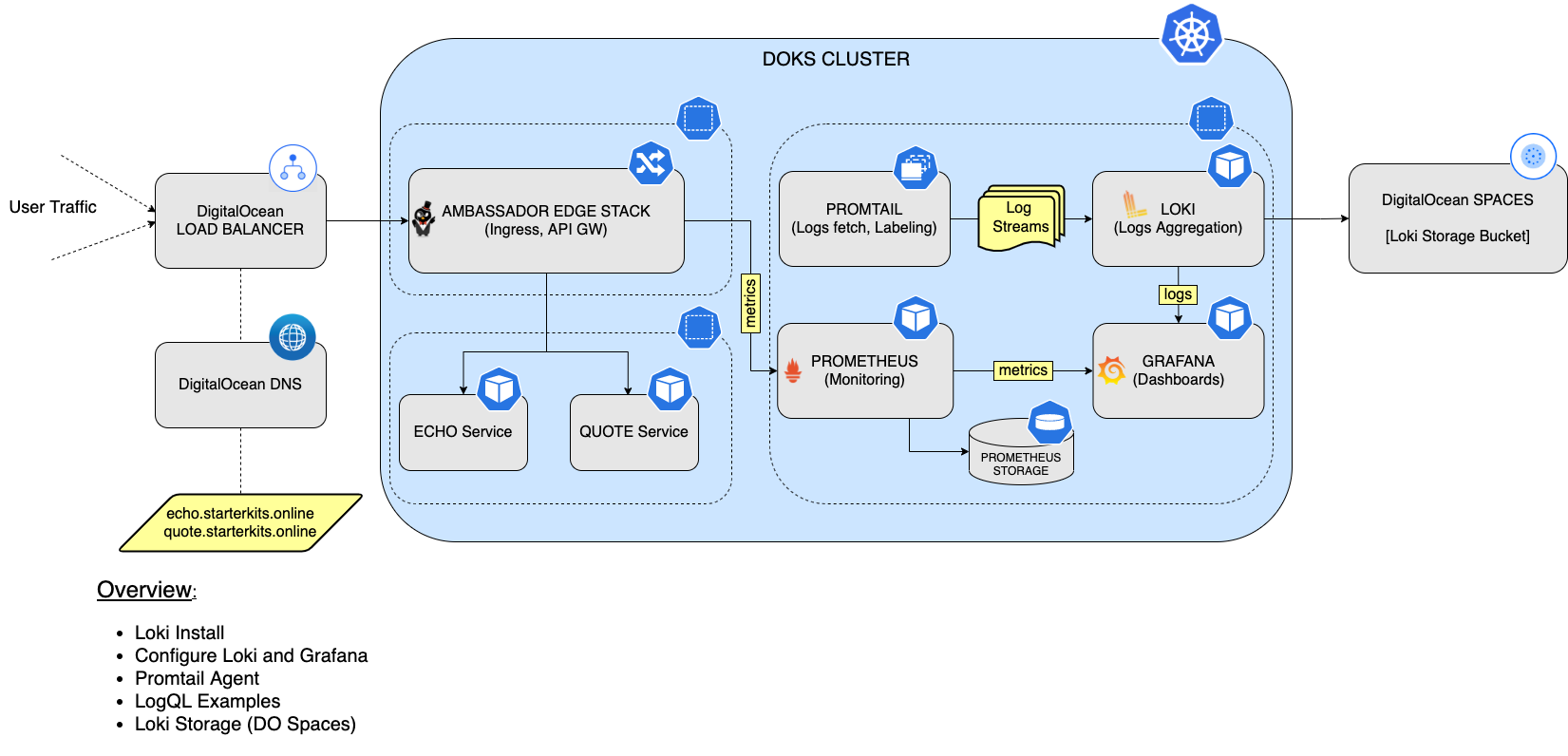
3️⃣ Loki Storage Architecture (Simple)
4️⃣ Loki Version (IMPORTANT)
Use Loki ≥ 2.8
👉 Uses TSDB + object storage (recommended)
Check version:
🔹 COMMON BASE CONFIG (ALL PROVIDERS)
This part is same for AWS, Azure, DO.
/etc/loki/loki-config.yml
auth_enabled: false

server:
  http_listen_port: 3100

common:
  path_prefix: /loki
  replication_factor: 1
  ring:
    kvstore:
      store: inmemory

schema_config:
  configs:
    - from: 2023-01-01
      store: tsdb
      object_store: s3   # (azure / s3)
      schema: v13
      index:
        prefix: loki_index_
        period: 24h

storage_config:
  tsdb_shipper:
    active_index_directory: /loki/index
    cache_location: /loki/cache
⚠️ object_store value depends on backend
We’ll change that below.
🟢 OPTION 1: AWS S3 (BEST & MOST USED)
5️⃣ AWS S3 Setup
Create:
-
S3 bucket (e.g.
loki-logs-prod) -
IAM user with programmatic access
IAM Policy (Minimum)
{
  "Version": "2012-10-17",
  "Statement": [
    {
      "Effect": "Allow",
      "Action": [
        "s3:ListBucket"
      ],
      "Resource": "arn:aws:s3:::loki-logs-prod"
    },
    {
      "Effect": "Allow",
      "Action": [
        "s3:GetObject",
        "s3:PutObject",
        "s3:DeleteObject"
      ],
      "Resource": "arn:aws:s3:::loki-logs-prod/*"
    }
  ]
}
6️⃣ Loki S3 Storage Config
storage_config:
  aws:
    s3: s3://ACCESS_KEY:SECRET_KEY@s3.amazonaws.com/loki-logs-prod
    region: ap-south-1
    s3forcepathstyle: false
✔ Native AWS
✔ Highly reliable
✔ Best documentation
🟦 OPTION 2: Azure Blob Storage
7️⃣ Azure Storage Setup
Create:
-
Storage Account
-
Container (e.g.
loki)
Get:
-
Account Name
-
Account Key
8️⃣ Loki Azure Storage Config
Change schema:
Storage config:
storage_config:
  azure:
    account_name: mystorageaccount
    account_key: AZURE_STORAGE_KEY
    container_name: loki
✔ Works well in Azure
✔ Integrates with private endpoints
✔ Slightly slower than S3
🟣 OPTION 3: DigitalOcean Spaces (S3 Compatible)
9️⃣ DO Spaces Setup
Create:
-
Space (e.g.
loki-logs) -
Region (e.g.
blr1) -
Access key & secret
Endpoint:
🔟 Loki DigitalOcean Spaces Config
storage_config:
  aws:
    s3: s3://DO_ACCESS_KEY:DO_SECRET_KEY@blr1.digitaloceanspaces.com/loki-logs
    s3forcepathstyle: true
✔ Cheaper than AWS
✔ Perfect for startups
✔ Fully S3 compatible
11️⃣ Run Loki with Object Storage (Docker)
docker run -d \
  --name=loki \
  -p 3100:3100 \
  -v /etc/loki/loki-config.yml:/etc/loki/loki-config.yml \
  -v /loki:/loki \
  grafana/loki:2.9.4 \
  -config.file=/etc/loki/loki-config.yml
12️⃣ Verify Loki Storage is Working
Check logs:
Look for:
✅ Means object storage is working
13️⃣ Verify Objects in Bucket
You should see folders like:
14️⃣ Retention Policy (IMPORTANT)
Add:
Optional per-stream:
15️⃣ Which Storage Should You Choose?
Quick Recommendation
| Use Case | Best Choice |
|---|---|
| Enterprise / AWS infra | AWS S3 |
| Azure-only setup | Azure Blob |
| Startup / low cost | DO Spaces |
| On-prem | MinIO |
16️⃣ Security Best Practices
✔ Keep buckets private
✔ Use IAM / access keys
✔ Rotate secrets
✔ Use HTTPS only
✔ Do NOT expose Loki publicly
17️⃣ Production Loki Stack (Final)
✅ Final Summary
✔ Loki supports S3, Azure Blob, DO Spaces
✔ Use TSDB + object storage
✔ No log loss
✔ Cheap & scalable
✔ Production-grade logging