🔷 What is Apache Kafka?
Kafka is a distributed event streaming platform used to:
- Move data reliably
- Handle high throughput
- Process data in real time

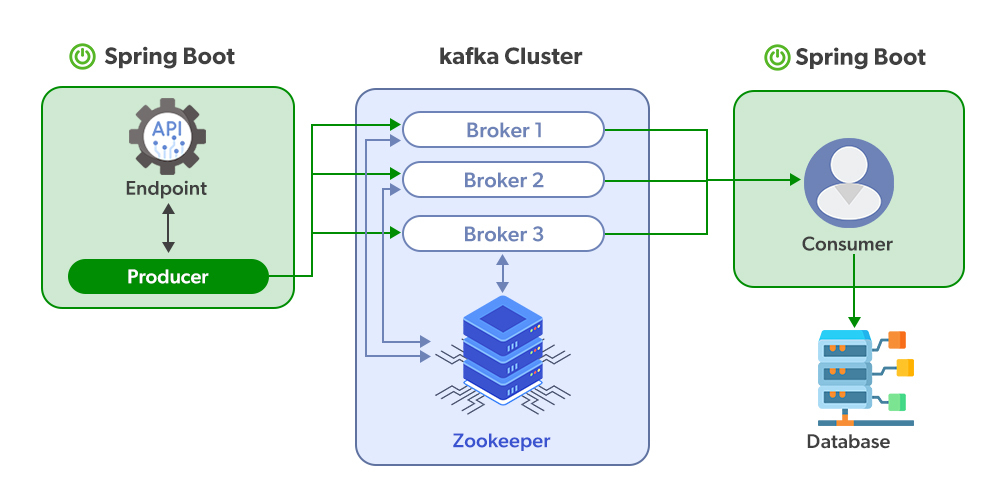
Kafka is used for:
- Event-driven microservices
- Log aggregation
- Metrics & monitoring
- Real-time analytics
- Stream processing (with Kafka Streams / Flink)
🔷 Kafka Core Concepts (Must Understand)
1️⃣ Events (Messages)
An event = key + value + timestamp Example:
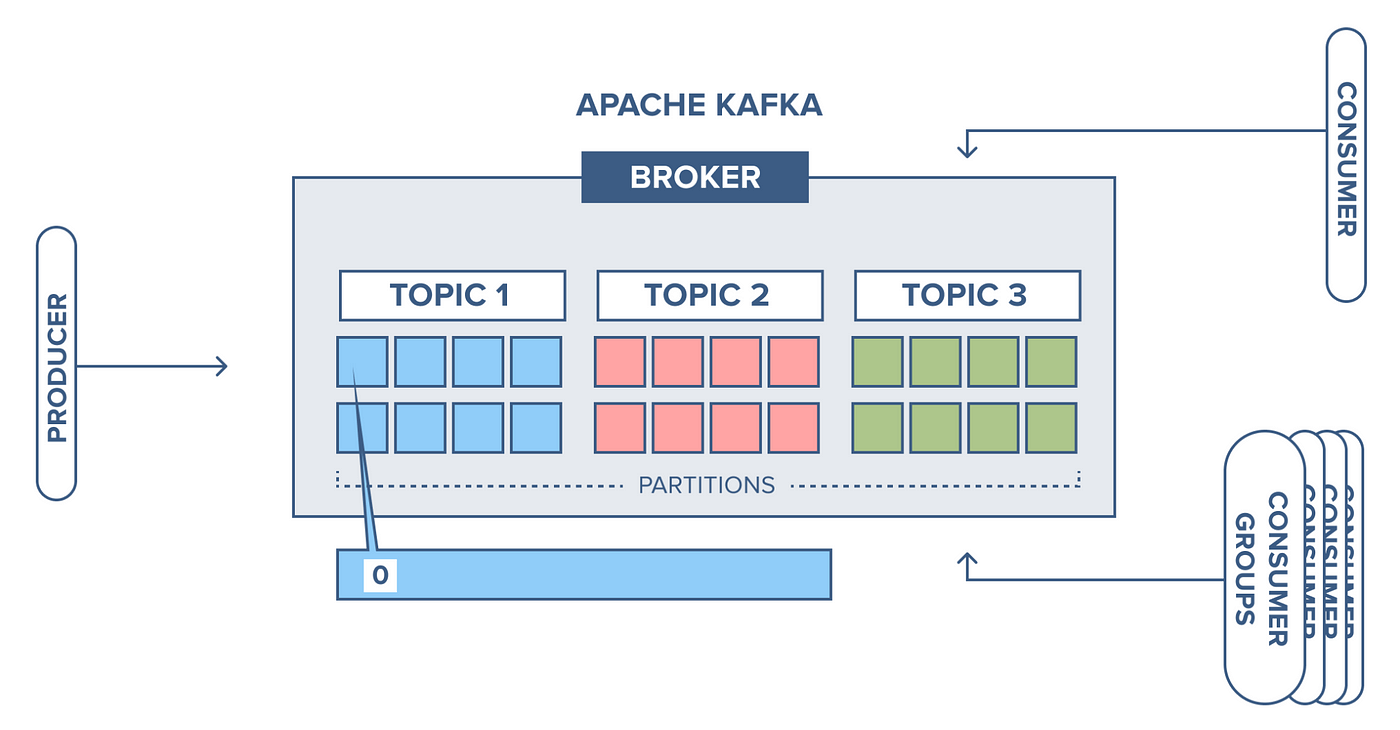
2️⃣ Topics
A topic is a named stream of events.
Example:
Topics are:
- Append-only
- Immutable
- Distributed
3️⃣ Partitions (🔥 VERY IMPORTANT)
Each topic is split into partitions.
Why?
- Parallelism
- Scalability
- Ordering (per partition)
👉 Ordering is guaranteed only within a partition, not across the topic.
4️⃣ Offsets
Each message has an offset (sequence number).
Consumers track offsets → enables replay.
5️⃣ Producers
- Send data to Kafka
- Choose topic + key
- Kafka decides partition
6️⃣ Consumers
- Read data from Kafka
- Belong to consumer groups
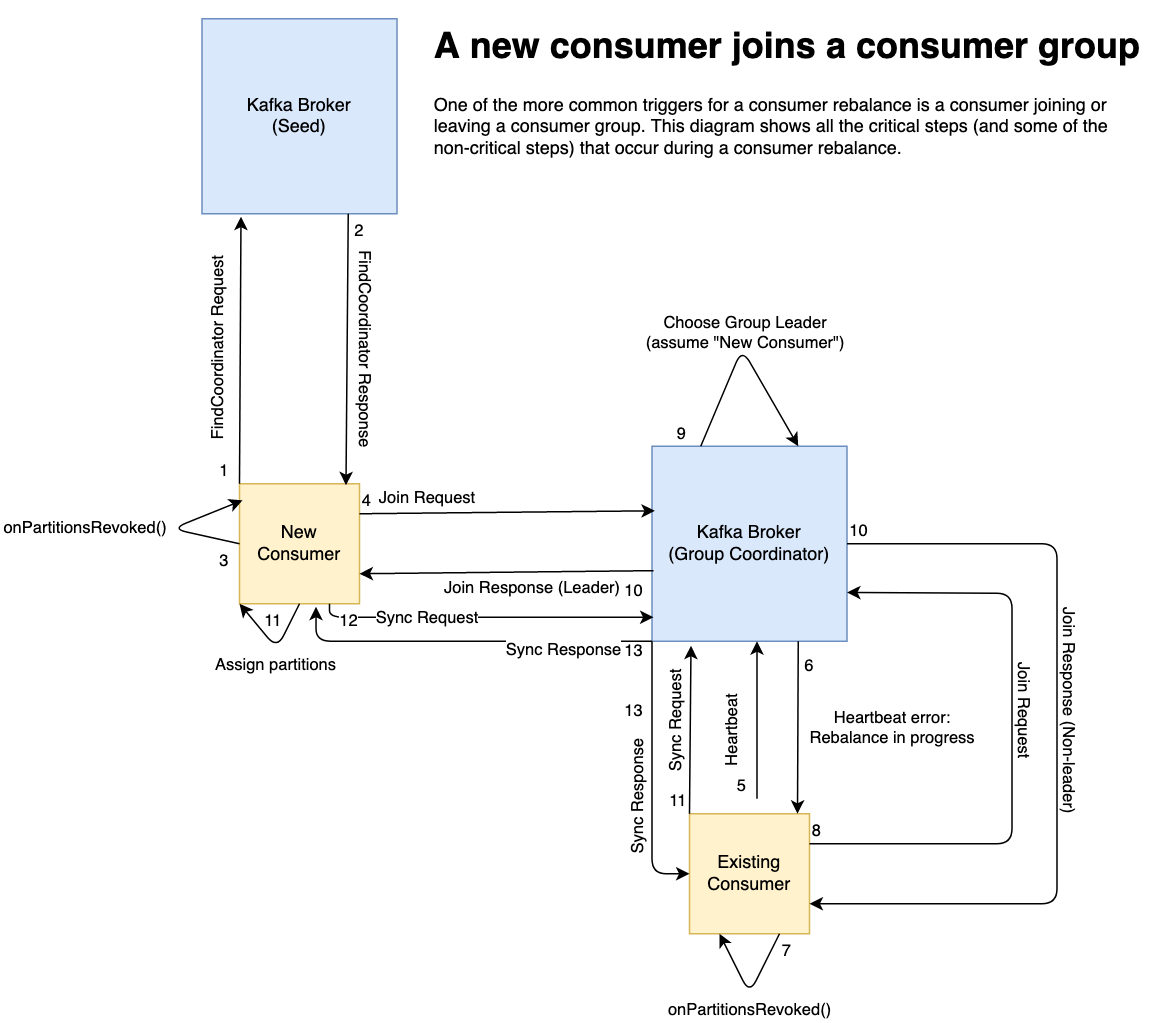
7️⃣ Consumer Groups (Critical)
- One partition → consumed by only one consumer in a group
- Enables horizontal scaling
Topic: 3 partitions
Consumer Group:
 ├─ Consumer 1 → Partition 0
 ├─ Consumer 2 → Partition 1
 └─ Consumer 3 → Partition 2
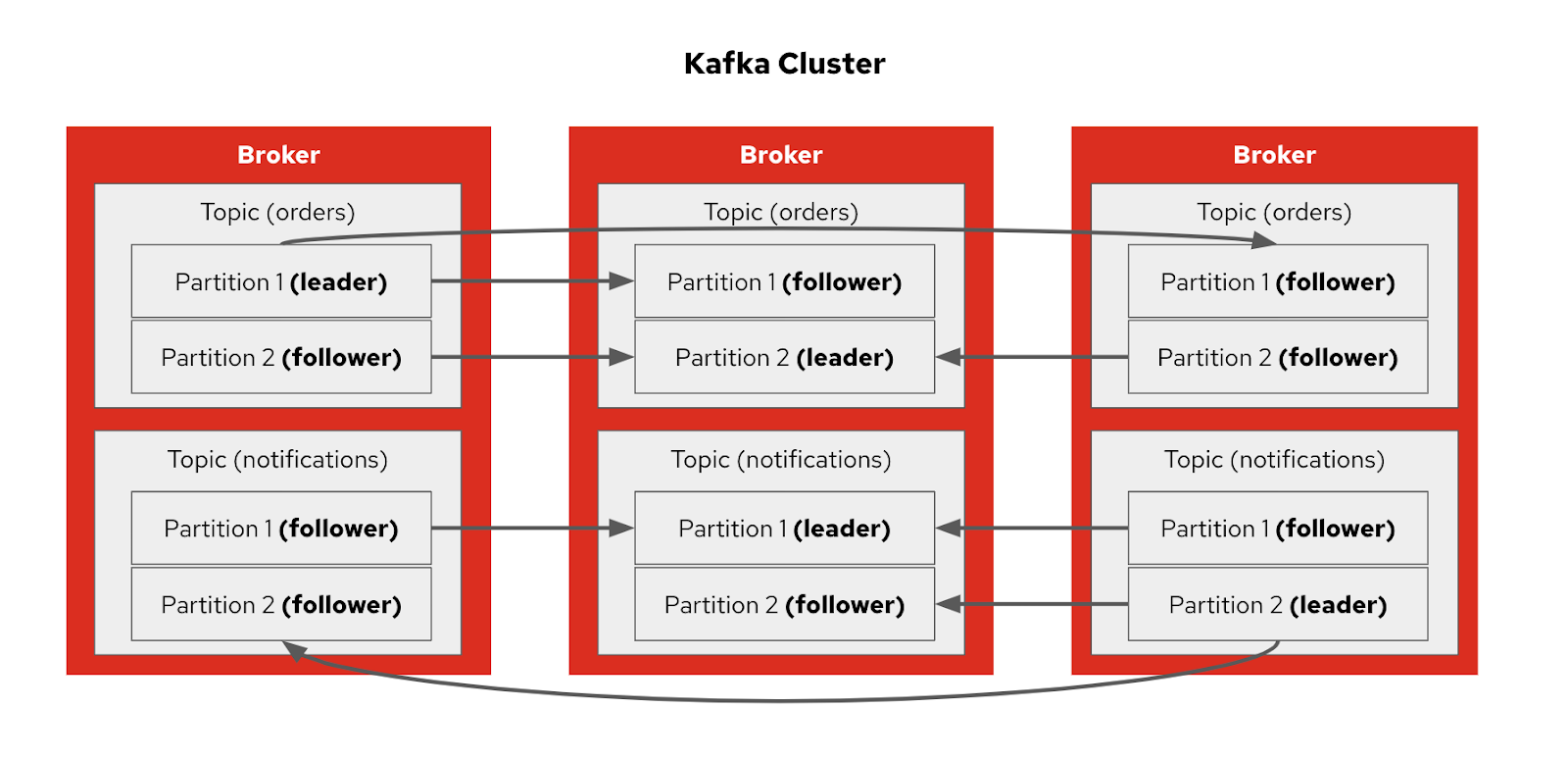
8️⃣ Brokers
Kafka runs as a cluster.
Each Kafka server = Broker
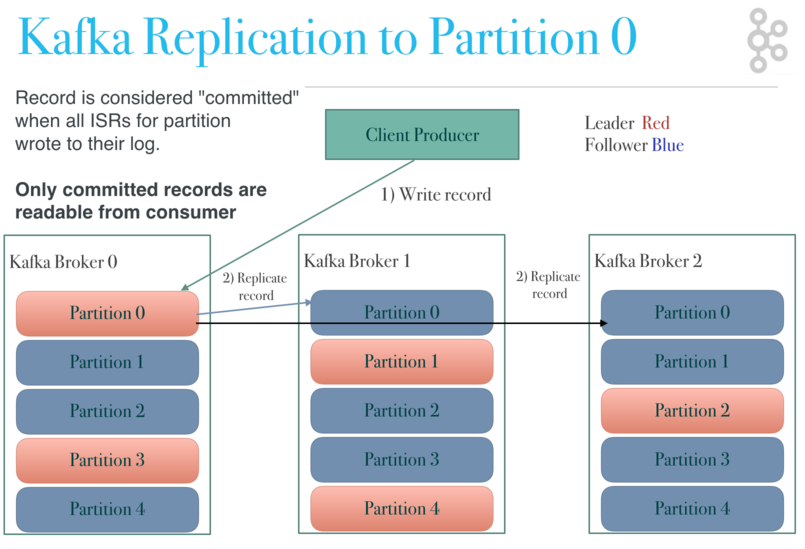
9️⃣ Replication (Fault Tolerance)
Each partition has:
- Leader
- Followers
If leader dies → follower becomes leader.
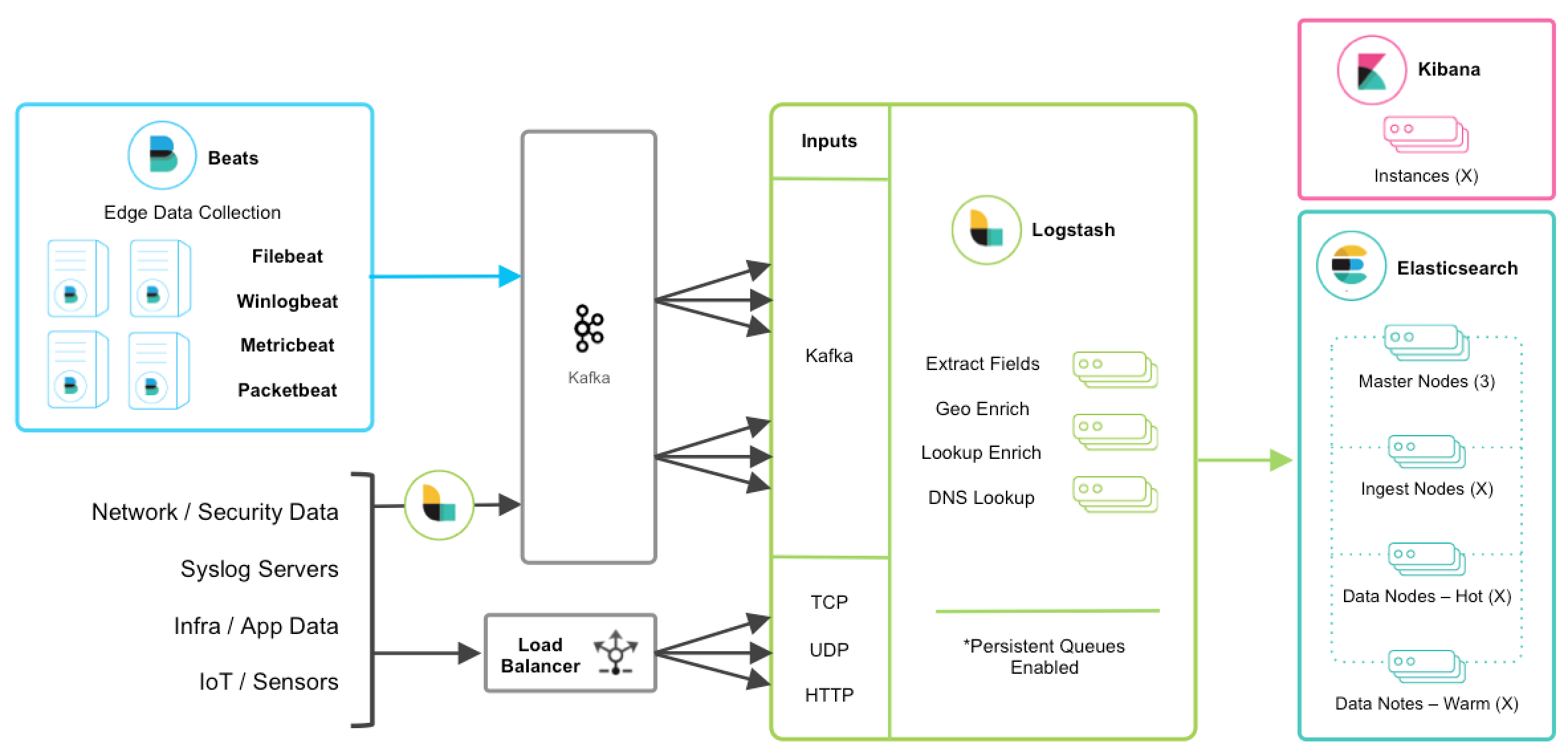
🔷 Kafka Architecture (Big Picture)
🔷 Installation (Local Setup with Docker) ✅
📦 Prerequisites
- Docker
- Docker Compose
🔹 docker-compose.yml (Kafka + Zookeeper)
version: "3.8"

services:
  zookeeper:
    image: confluentinc/cp-zookeeper:7.6.0
    environment:
      ZOOKEEPER_CLIENT_PORT: 2181

  kafka:
    image: confluentinc/cp-kafka:7.6.0
    depends_on:
      - zookeeper
    ports:
      - "9092:9092"
    environment:
      KAFKA_BROKER_ID: 1
      KAFKA_ZOOKEEPER_CONNECT: zookeeper:2181
      KAFKA_ADVERTISED_LISTENERS: PLAINTEXT://localhost:9092
      KAFKA_LISTENERS: PLAINTEXT://0.0.0.0:9092
      KAFKA_OFFSETS_TOPIC_REPLICATION_FACTOR: 1
Start Kafka:
Check:
🔷 Kafka CLI Hands-On (VERY IMPORTANT)
1️⃣ Create Topic
docker exec -it kafka kafka-topics \
--create \
--topic user-events \
--bootstrap-server localhost:9092 \
--partitions 3 \
--replication-factor 1
2️⃣ List Topics
3️⃣ Describe Topic
docker exec -it kafka kafka-topics \
--describe \
--topic user-events \
--bootstrap-server localhost:9092
4️⃣ Produce Messages
docker exec -it kafka kafka-console-producer \
--topic user-events \
--bootstrap-server localhost:9092
Type:
5️⃣ Consume Messages
docker exec -it kafka kafka-console-consumer \
--topic user-events \
--from-beginning \
--bootstrap-server localhost:9092
🔷 Consumer Groups (Hands-On)
Start consumer with group
docker exec -it kafka kafka-console-consumer \
--topic user-events \
--group user-service \
--bootstrap-server localhost:9092
Describe consumer group
docker exec -it kafka kafka-consumer-groups \
--describe \
--group user-service \
--bootstrap-server localhost:9092
🔷 Kafka with Programming (Go Example)
Producer (Go)
writer := kafka.NewWriter(kafka.WriterConfig{
    Brokers: []string{"localhost:9092"},
    Topic:   "user-events",
})

writer.WriteMessages(context.Background(),
    kafka.Message{
        Key:   []byte("user1"),
        Value: []byte("login"),
    },
)
Consumer (Go)
reader := kafka.NewReader(kafka.ReaderConfig{
    Brokers: []string{"localhost:9092"},
    Topic:   "user-events",
    GroupID: "user-service",
})

msg, _ := reader.ReadMessage(context.Background())
fmt.Println(string(msg.Value))
🔷 Kafka Delivery Semantics
| Type | Meaning |
|---|---|
| At most once | Possible data loss |
| At least once | Possible duplicates |
| Exactly once | No loss, no duplicates (hard) |
👉 Kafka defaults to at least once
🔷 Kafka vs RabbitMQ (Quick Compare)
| Feature | Kafka | RabbitMQ |
|---|---|---|
| Message retention | Time-based | Queue-based |
| Replay messages | ✅ Yes | ❌ No |
| Throughput | Very high | Medium |
| Ordering | Per partition | Per queue |
| Use case | Streaming | Task queues |
🔷 Kafka in Real Production (DevOps View)
🔐 Security
- TLS (SSL)
- SASL authentication
- ACLs (topic-level access)
📊 Monitoring
- Prometheus + Grafana
- Kafka Exporter
- Lag monitoring
📦 Storage
- Disk-based
- Log compaction
- Retention policies
🔷 Advanced Kafka Ecosystem
| Tool | Purpose |
|---|---|
| Kafka Streams | Stream processing |
| Kafka Connect | Source → Kafka / Kafka → Sink |
| Schema Registry | Avro/Protobuf schemas |
| Apache Flink | Advanced streaming |
🔷 Common Mistakes 🚨
❌ Too many partitions ❌ Ignoring consumer lag ❌ No retention policy ❌ Using Kafka like a DB ❌ Not monitoring disk usage
🔷 Mental Model (Remember This)
Kafka is not a queue — it is a distributed commit log.
🔷 Learning Roadmap (Recommended)
1️⃣ Kafka basics & CLI 2️⃣ Producers / Consumers 3️⃣ Consumer groups 4️⃣ Partition strategy 5️⃣ Retention & compaction 6️⃣ Security 7️⃣ Monitoring 8️⃣ Kafka Streams
✅ What You Can Build Now
- Event-driven microservices
- Audit logs
- Metrics pipeline
- Real-time notifications
- Streaming ETL