1️⃣ What is Apache Airflow?
Apache Airflow is a workflow orchestration platform.
Think of it as:
“A scheduler + executor that runs your jobs in the right order, at the right time, with retries and visibility.”
🧠 What You’ll Learn (Roadmap)
- What Apache Airflow is (mental model)
- Core Airflow components (with flow)
- Executors overview (why Celery)
- Architecture: Airflow + Celery + Redis
- Local setup (Docker-based, production-like)
- Writing DAGs (basic → real-world)
- Task distribution with Celery workers
- Monitoring, retries, backfills
- Common commands & debugging
- Best practices
What Airflow is GOOD at
✅ ETL pipelines ✅ Data engineering workflows ✅ Batch jobs ✅ ML pipelines ✅ Cron replacement with observability
What Airflow is NOT
❌ Real-time streaming ❌ Event-driven APIs ❌ Long-running services
2️⃣ Airflow Core Concepts (Very Important)
🔹 DAG
- Directed Acyclic Graph
- Python file that defines workflow
- Nodes = tasks, edges = dependencies
🔹 Task
- A single unit of work
- Example: run a bash command, execute Python, call API
🔹 Operator
- Template for a task
-
Examples:
-
PythonOperator BashOperatorDockerOperator
🔹 Scheduler
- Decides when tasks should run
🔹 Executor
- Decides how tasks are executed
3️⃣ Executors Explained (Why Celery?)
| Executor | Use Case |
|---|---|
| Sequential | Learning only |
| LocalExecutor | Single machine |
| CeleryExecutor | Distributed, scalable |
| KubernetesExecutor | Cloud-native |
Why CeleryExecutor?
- Multiple workers
- Horizontal scaling
- Reliable for production
- Industry standard
4️⃣ Architecture: Airflow + Celery + Redis
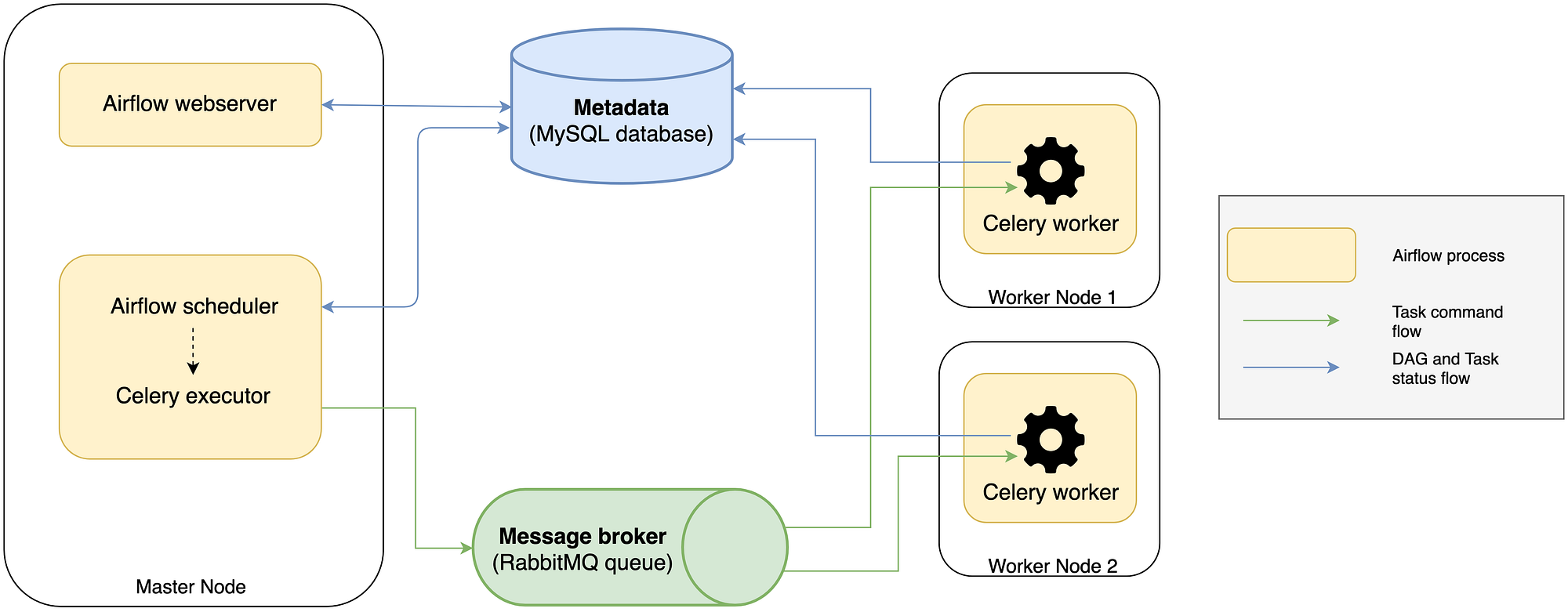
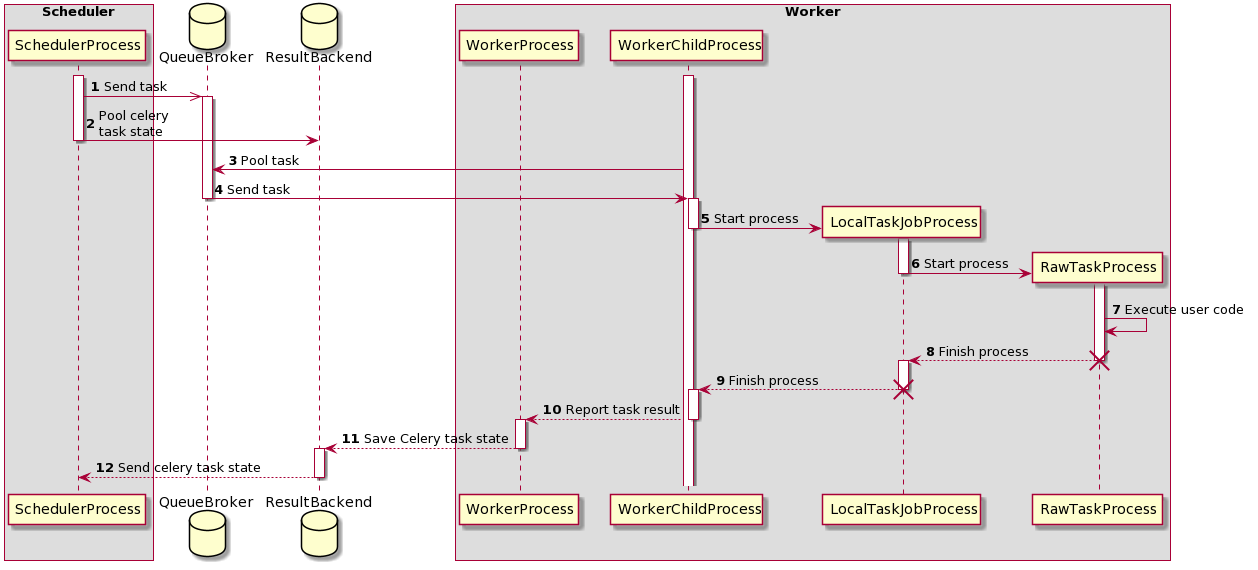
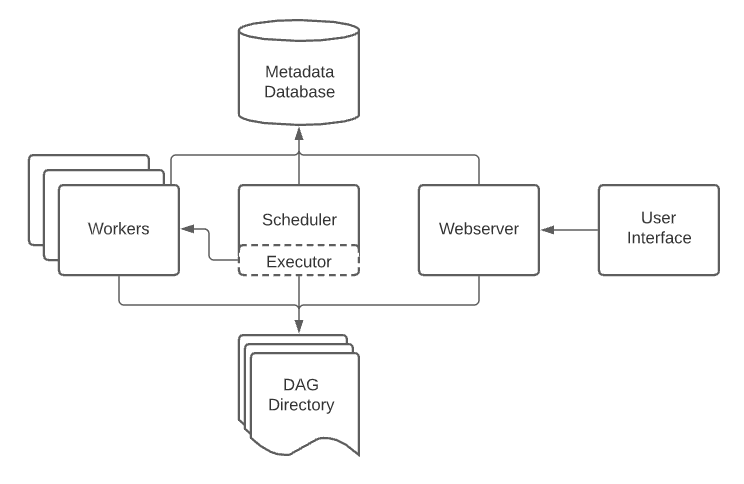
Flow (Understand this clearly 👇)
Components
| Component | Role |
|---|---|
| Webserver | UI |
| Scheduler | Schedules tasks |
| Redis | Message broker |
| Celery Workers | Execute tasks |
| Postgres | Metadata DB |
5️⃣ Install Airflow with Celery + Redis (Docker)
📁 Project Structure
📄 docker-compose.yml
version: "3.8"

x-airflow-common: &airflow-common
  image: apache/airflow:2.8.1
  environment:
    AIRFLOW__CORE__EXECUTOR: CeleryExecutor
    AIRFLOW__DATABASE__SQL_ALCHEMY_CONN: postgresql+psycopg2://airflow:airflow@postgres/airflow
    AIRFLOW__CELERY__RESULT_BACKEND: db+postgresql://airflow:airflow@postgres/airflow
    AIRFLOW__CELERY__BROKER_URL: redis://redis:6379/0
    AIRFLOW__CORE__LOAD_EXAMPLES: "false"
  volumes:
    - ./dags:/opt/airflow/dags
  depends_on:
    - redis
    - postgres

services:

  postgres:
    image: postgres:15
    environment:
      POSTGRES_USER: airflow
      POSTGRES_PASSWORD: airflow
      POSTGRES_DB: airflow

  redis:
    image: redis:7

  airflow-webserver:
    <<: *airflow-common
    command: webserver
    ports:
      - "8080:8080"

  airflow-scheduler:
    <<: *airflow-common
    command: scheduler

  airflow-worker:
    <<: *airflow-common
    command: celery worker

  airflow-init:
    <<: *airflow-common
    command: bash -c "airflow db init && airflow users create \
      --username admin \
      --password admin \
      --firstname Admin \
      --lastname User \
      --role Admin \
      --email admin@example.com"
▶️ Start Airflow
Access UI:
6️⃣ Your First DAG (Hands-On)
📄 dags/example_dag.py
from airflow import DAG
from airflow.operators.python import PythonOperator
from datetime import datetime

def hello():
    print("Hello from Airflow Celery Worker!")

with DAG(
    dag_id="hello_celery",
    start_date=datetime(2024, 1, 1),
    schedule_interval="@daily",
    catchup=False,
) as dag:

    task_1 = PythonOperator(
        task_id="hello_task",
        python_callable=hello
    )

    task_1
What happens?
- Scheduler queues task
- Redis stores message
- Celery worker picks it up
- Worker executes task
7️⃣ Verify Celery Workers Are Working
Check worker logs
You should see:
🎉 You are now running distributed Airflow tasks
8️⃣ Parallel Tasks Example (Real Practice)
from airflow import DAG
from airflow.operators.bash import BashOperator
from datetime import datetime

with DAG(
    "parallel_tasks",
    start_date=datetime(2024, 1, 1),
    schedule_interval=None,
    catchup=False,
) as dag:

    t1 = BashOperator(
        task_id="task_1",
        bash_command="sleep 10"
    )

    t2 = BashOperator(
        task_id="task_2",
        bash_command="sleep 10"
    )

    t3 = BashOperator(
        task_id="task_3",
        bash_command="sleep 10"
    )

    [t1, t2] >> t3
👉 Watch multiple workers executing in parallel.
9️⃣ Important Airflow CLI Commands
# List DAGs
airflow dags list

# Trigger DAG
airflow dags trigger hello_celery

# Test task locally
airflow tasks test hello_celery hello_task 2024-01-01

# Check Celery worker
airflow celery status
🔟 Common Problems & Fixes
❌ Tasks stuck in "Queued"
✔ Redis not reachable ✔ Worker not running
Check:
❌ ImportError in DAG
✔ Missing Python library ✔ Add via custom image or requirements.txt
🔐 Best Practices (Production Mindset)
✅ One DAG = one business workflow ✅ Use retries & SLA ✅ Avoid heavy logic inside DAG file ✅ Keep tasks idempotent ✅ Version control DAGs ✅ Monitor with Prometheus / StatsD
🧪 Practice Ideas (Do These Next)
- ETL pipeline (API → Transform → DB)
- ML training DAG
- File processing pipeline
- Trigger DAG from REST API
- Add Flower for Celery monitoring
- Add Airflow variables & connections
- Use Redis CLI to inspect queues