What is SonarQube? (Quick context)
SonarQube is a Static Application Security Testing (SAST) and code quality platform.

It detects:
- Bugs 🐞
- Vulnerabilities 🔐
- Code smells 🧹
- Security hotspots
- Technical debt
Used in:
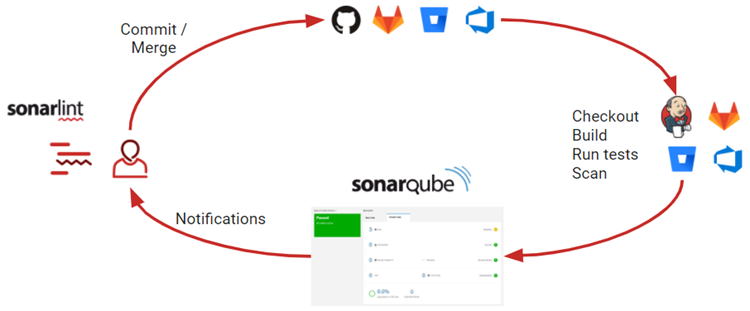
- CI/CD pipelines
- Pull request checks
- Code review automation
SonarQube Architecture (Simple)
Components:
- SonarQube Server – UI + rules engine
- Database – PostgreSQL (recommended)
- Sonar Scanner – CLI / CI tool
PART 1 — Local SonarQube Setup (Docker)
1️⃣ Prerequisites
- Docker
- Docker Compose
- 4 GB RAM minimum
2️⃣ Docker Compose (Production-like)
version: "3.8"

services:
  sonarqube:
    image: sonarqube:lts
    container_name: sonarqube
    depends_on:
      - db
    ports:
      - "9000:9000"
    environment:
      SONAR_JDBC_URL: jdbc:postgresql://db:5432/sonar
      SONAR_JDBC_USERNAME: sonar
      SONAR_JDBC_PASSWORD: sonar
    volumes:
      - sonarqube_data:/opt/sonarqube/data
      - sonarqube_extensions:/opt/sonarqube/extensions
      - sonarqube_logs:/opt/sonarqube/logs

  db:
    image: postgres:15
    container_name: sonar-db
    environment:
      POSTGRES_USER: sonar
      POSTGRES_PASSWORD: sonar
      POSTGRES_DB: sonar
    volumes:
      - postgresql:/var/lib/postgresql
      - postgresql_data:/var/lib/postgresql/data

volumes:
  sonarqube_data:
  sonarqube_extensions:
  sonarqube_logs:
  postgresql:
  postgresql_data:
Start:
Access:
3️⃣ First Login
→ Change password immediately.
PART 2 — Create Project & Token


Steps:
- Create Project
- Choose Manually
- Project Key:
my-node-app - Generate Token
- Save token (used by scanner)
PART 3 — Scan Code Locally
Option A — Sonar Scanner CLI (Recommended)
1️⃣ Install Scanner
wget https://binaries.sonarsource.com/Distribution/sonar-scanner-cli/sonar-scanner-cli-5.0.1.3006-linux.zip
unzip sonar-scanner-cli-*.zip
sudo mv sonar-scanner-* /opt/sonar-scanner
export PATH=$PATH:/opt/sonar-scanner/bin
2️⃣ Add sonar-project.properties
sonar.projectKey=my-node-app
sonar.projectName=My Node App
sonar.projectVersion=1.0

sonar.sources=.
sonar.language=js
sonar.sourceEncoding=UTF-8

sonar.exclusions=node_modules/**,dist/**
sonar.javascript.lcov.reportPaths=coverage/lcov.info
3️⃣ Run Scan
✅ Results appear in dashboard.
Option B — Scan Using Docker (Cleaner)
docker run --rm \
  -e SONAR_HOST_URL="http://host.docker.internal:9000" \
  -e SONAR_LOGIN="TOKEN" \
  -v "$(pwd):/usr/src" \
  sonarsource/sonar-scanner-cli
PART 4 — Understanding the Dashboard


Key Sections:
| Section | Meaning |
|---|---|
| Bugs | Runtime errors |
| Vulnerabilities | Security risks |
| Code Smells | Maintainability issues |
| Security Hotspots | Needs manual review |
| Coverage | Unit test coverage |
| Duplication | Repeated code |
PART 5 — Quality Gates (Very Important)
Default Quality Gate Rules
❌ Build FAILS if:
- New bugs > 0
- New vulnerabilities > 0
- Coverage < 80%
- Code smells exceed threshold
Custom Quality Gate
Common production rule:
PART 6 — CI/CD Integration
GitHub Actions Example (Node.js)

name: SonarQube Scan

on:
  push:
    branches: [main, develop]
  pull_request:

jobs:
  sonar:
    runs-on: ubuntu-latest

    steps:
      - uses: actions/checkout@v4

      - uses: actions/setup-node@v4
        with:
          node-version: 18

      - run: npm install
      - run: npm test -- --coverage || true

      - name: SonarQube Scan
        uses: SonarSource/sonarqube-scan-action@v2
        env:
          SONAR_TOKEN: ${{ secrets.SONAR_TOKEN }}
          SONAR_HOST_URL: ${{ secrets.SONAR_HOST_URL }}
Secrets:
Block Deployment if Quality Gate Fails
- name: Quality Gate
  uses: SonarSource/sonarqube-quality-gate-action@v1
  timeout-minutes: 5
  env:
    SONAR_TOKEN: ${{ secrets.SONAR_TOKEN }}
PART 7 — Language Support (Backend Focus)
| Language | Support |
|---|---|
| Java | ⭐⭐⭐⭐⭐ |
| JavaScript / TS | ⭐⭐⭐⭐⭐ |
| Go | ⭐⭐⭐⭐ |
| Python | ⭐⭐⭐⭐ |
| PHP | ⭐⭐⭐⭐ |
| C / C++ | ⭐⭐⭐ |
| Kotlin | ⭐⭐⭐⭐ |
PART 8 — SonarQube vs SCA vs DAST
| Tool | Purpose |
|---|---|
| SonarQube | SAST (code quality + security) |
| Snyk / OWASP DC | SCA (dependency vulnerabilities) |
| OWASP ZAP | DAST (runtime attacks) |
👉 Best practice: SAST + SCA + DAST
PART 9 — Production Best Practices
✅ Use LTS version ✅ PostgreSQL only ✅ Run behind Nginx + HTTPS ✅ Daily DB backups ✅ Integrate with CI, not manual scans ✅ Enforce Quality Gate before deploy