🧠 What is Site-to-Site VPN (S2S)?
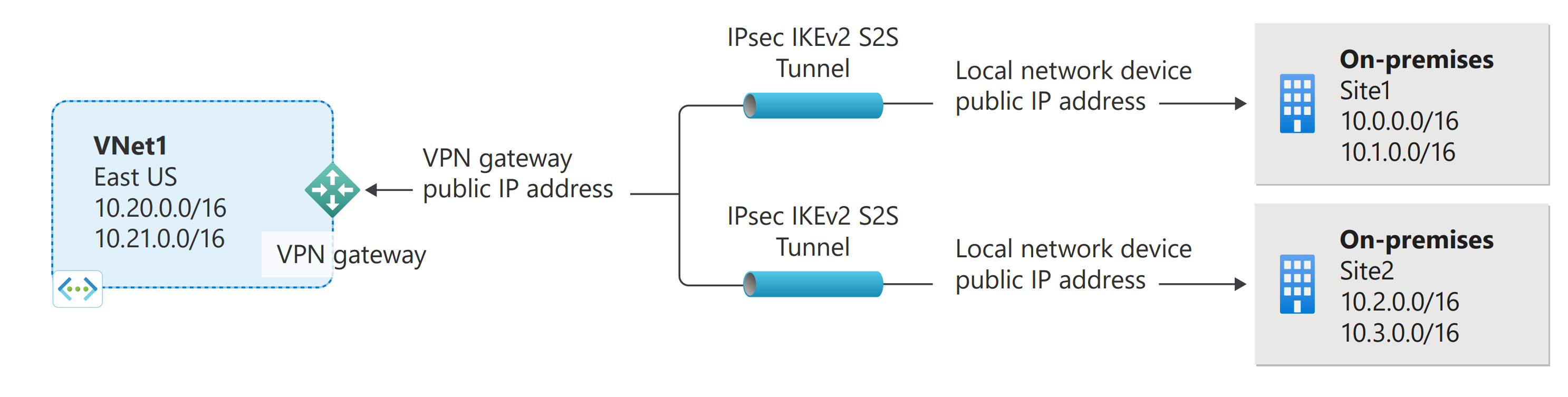


Site-to-Site VPN creates a permanent encrypted tunnel (IPsec/IKE) between:
- Your on-premises network (office / datacenter / another cloud)
- An Azure Virtual Network (VNet)
When to use S2S
- Hybrid cloud
- Private DB access from on-prem
- Gradual cloud migration
- Centralized identity / logging
🧱 Final Architecture (Target State)
On-Prem Network (192.168.1.0/24)
   |
[ VPN Device ]
   |  IPsec Tunnel
   |
[ Azure VPN Gateway ]
   |
[ GatewaySubnet ]
   |
[ Azure VNet ]
   |
[ Private Subnets / VMs / DB ]
STEP 0️⃣ Prerequisites (Mandatory)
| Requirement | Notes |
|---|---|
| Azure subscription | Owner / Network Contributor |
| VNet | Already created |
| Non-overlapping CIDR | Azure & on-prem must NOT overlap |
| On-prem public IP | Static (recommended) |
| VPN device | StrongSwan / pfSense / Cisco / FortiGate |
STEP 1️⃣ Create Azure Virtual Network
Address Plan (Example)
| Network | CIDR |
|---|---|
| Azure VNet | 10.0.0.0/16 |
| App Subnet | 10.0.1.0/24 |
| GatewaySubnet | 10.0.255.0/27 |
| On-prem | 192.168.1.0/24 |
⚠️ CIDR overlap = VPN will not work
Azure CLI
az network vnet create \
  --resource-group rg-network \
  --name hub-vnet \
  --address-prefix 10.0.0.0/16 \
  --subnet-name app-subnet \
  --subnet-prefix 10.0.1.0/24
STEP 2️⃣ Create GatewaySubnet (CRITICAL)
🚨 Rules
- Name must be exactly
GatewaySubnet - No NSG
- No route table
- Large enough (/27 or bigger)
Azure CLI
az network vnet subnet create \
  --resource-group rg-network \
  --vnet-name hub-vnet \
  --name GatewaySubnet \
  --address-prefix 10.0.255.0/27
STEP 3️⃣ Create Public IP for VPN Gateway
az network public-ip create \
  --resource-group rg-network \
  --name vpn-gateway-pip \
  --allocation-method Dynamic
VPN Gateway must have a public IP
STEP 4️⃣ Create VPN Gateway (Core Component)
⏳ Takes 30–45 minutes
Portal Settings
| Setting | Value |
|---|---|
| Gateway type | VPN |
| VPN type | Route-based |
| SKU | VpnGw1 |
| Generation | Gen1 |
| Virtual network | hub-vnet |
| Public IP | vpn-gateway-pip |
Azure CLI
az network vnet-gateway create \
  --resource-group rg-network \
  --name hub-vpn-gateway \
  --vnet hub-vnet \
  --gateway-type Vpn \
  --vpn-type RouteBased \
  --sku VpnGw1 \
  --public-ip-address vpn-gateway-pip
STEP 5️⃣ Create Local Network Gateway (On-Prem Representation)
This tells Azure:
- Where your on-prem network lives
- What IP ranges exist there
Example Values
| Field | Example |
|---|---|
| On-prem public IP | 203.0.113.10 |
| Address space | 192.168.1.0/24 |
Azure CLI
az network local-gateway create \
  --resource-group rg-network \
  --name onprem-lng \
  --gateway-ip-address 203.0.113.10 \
  --local-address-prefixes 192.168.1.0/24
STEP 6️⃣ Create Site-to-Site VPN Connection
This step creates the IPsec tunnel
Shared Key Rules
- Same on Azure + on-prem
- Long & complex
- PSK-based authentication
Azure CLI
az network vpn-connection create \
  --resource-group rg-network \
  --name s2s-connection \
  --vnet-gateway1 hub-vpn-gateway \
  --local-gateway2 onprem-lng \
  --shared-key "MyStrongSharedKey@123"
STEP 7️⃣ Configure On-Prem VPN Device (Example: StrongSwan)
Azure side is useless unless on-prem is configured
Example (StrongSwan)
conn azure-vpn
    authby=psk
    keyexchange=ikev2
    left=%defaultroute
    leftid=203.0.113.10
    leftsubnet=192.168.1.0/24
    right=<Azure_VPN_Public_IP>
    rightsubnet=10.0.0.0/16
    ike=aes256-sha256-modp1024
    esp=aes256-sha256
    auto=start
STEP 8️⃣ Validation (MOST IMPORTANT)
1️⃣ Azure Portal
2️⃣ From On-Prem → Azure VM
✔ ICMP works (if NSG allows) ✔ SSH / DB access works
3️⃣ Effective Routes Check
You should see:
STEP 9️⃣ Common Issues & Fixes
| Problem | Cause | Fix |
|---|---|---|
| Status = Not connected | PSK mismatch | Recreate connection |
| No traffic | Overlapping CIDR | Redesign IP plan |
| One-way traffic | Firewall blocks | Allow IPsec / subnets |
| DNS not resolving | No DNS forwarding | Use Azure DNS / custom DNS |
🔐 Security Best Practices
✔ Use Route-based VPN only ✔ Rotate PSK regularly ✔ Restrict NSG rules ✔ Enable Azure Monitor alerts ✔ Use ExpressRoute for production scale
🏁 Final Mental Model
Local Network Gateway  = On-prem definition
VPN Gateway            = Azure tunnel endpoint
Connection             = Encrypted IPsec tunnel
GatewaySubnet          = Reserved gateway network