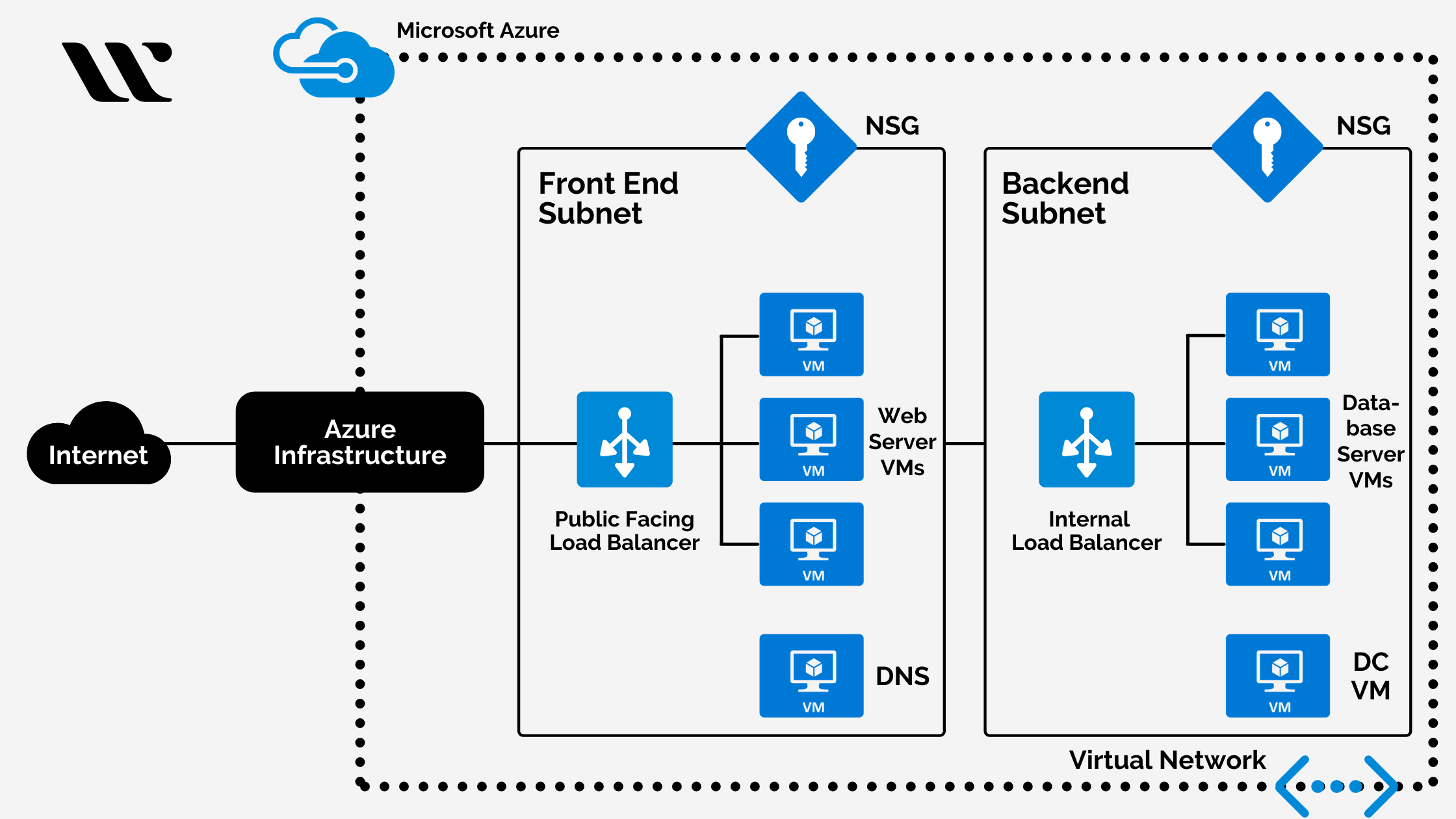

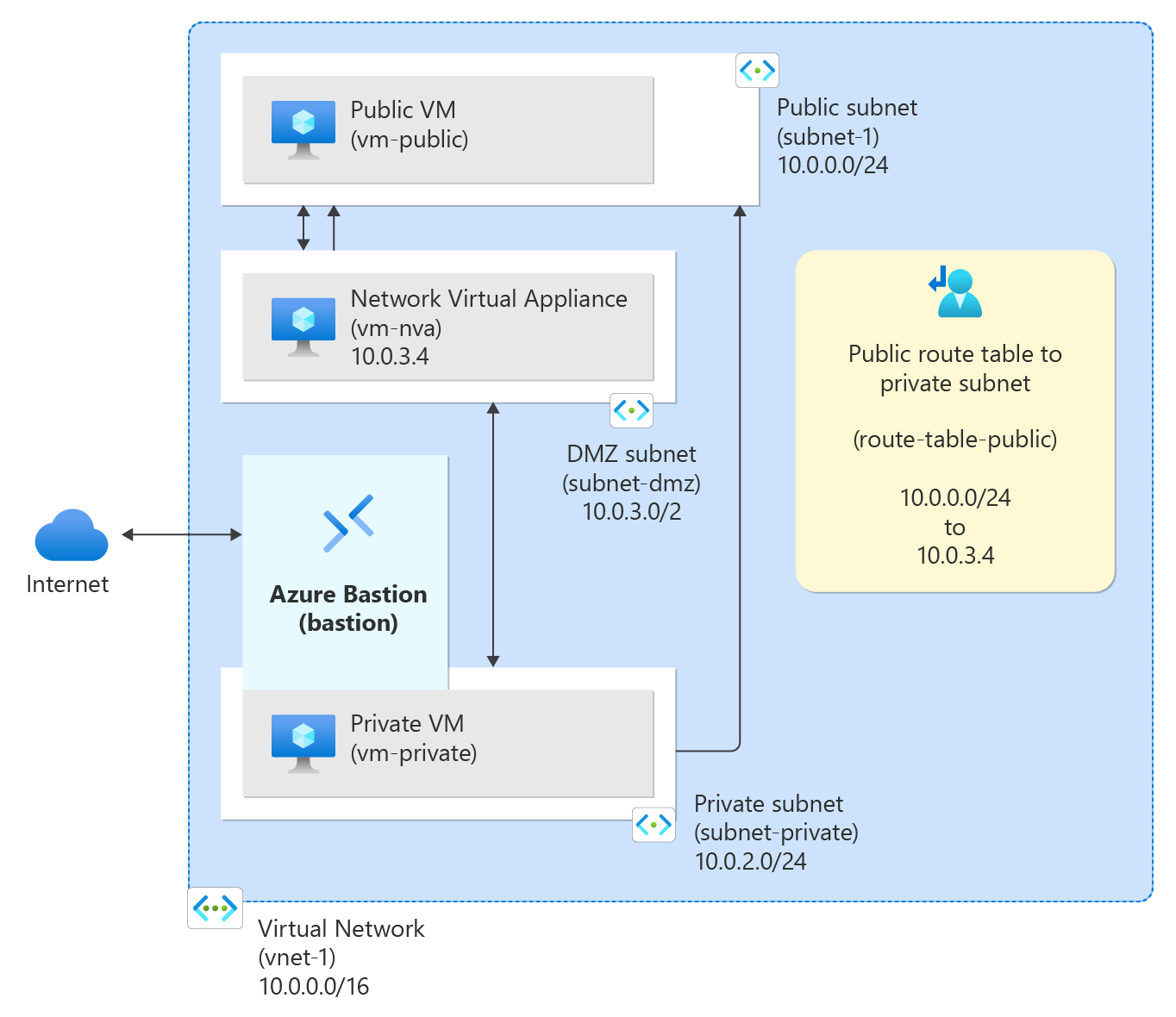
Below is the same setup you asked for — but now with clear explanations for each component and why it exists. No extra services. Only VNet, subnets, NSGs, route tables, routes.
🎯 Goal (What we are building)
We want a basic production-style network:
-
Public subnet
-
Can talk to the internet
-
Used for load balancers / public-facing apps
-
Private subnet
-
No direct internet access
- Used for databases / internal services
🧱 Final Architecture (Big Picture)
VNet (10.0.0.0/16)
│
├── Public Subnet (10.0.1.0/24)
│   ├─ NSG: Allow HTTP/HTTPS from Internet
│   └─ Route: 0.0.0.0/0 → Internet
│
└── Private Subnet (10.0.2.0/24)
    ├─ NSG: Allow traffic ONLY from Public Subnet
    └─ Route: 0.0.0.0/0 → Blocked
1️⃣ Resource Group — Logical Container
Explanation
- Resource Group = folder for Azure resources
- Makes deletion, permissions, and billing easier
- Always create networking resources in one RG
2️⃣ Virtual Network (VNet) — Private Network Boundary
az network vnet create \
  --resource-group rg-vnet-demo \
  --name vnet-main \
  --address-prefix 10.0.0.0/16
Explanation
10.0.0.0/16gives 65,536 private IPs- VNet = isolation boundary
- All subnets must fit inside this CIDR
3️⃣ Subnets — Network Segmentation
🔹 Public Subnet
az network vnet subnet create \
  --resource-group rg-vnet-demo \
  --vnet-name vnet-main \
  --name subnet-public \
  --address-prefix 10.0.1.0/24
Why Public?
- Hosts internet-facing components
- Will allow internet routes
-
Usually holds:
-
Load balancer
- Reverse proxy
- Bastion
🔹 Private Subnet
az network vnet subnet create \
  --resource-group rg-vnet-demo \
  --vnet-name vnet-main \
  --name subnet-private \
  --address-prefix 10.0.2.0/24
Why Private?
- No direct internet access
-
Safer for:
-
Databases
- Internal APIs
- Security by isolation
4️⃣ Network Security Groups (NSG) — Subnet Firewall
🔐 Public NSG
Rule: Allow Web Traffic
az network nsg rule create \
  --resource-group rg-vnet-demo \
  --nsg-name nsg-public \
  --name Allow-Web \
  --priority 100 \
  --direction Inbound \
  --access Allow \
  --protocol Tcp \
  --destination-port-ranges 80 443
Explanation
- NSG = Layer 4 firewall
- Allows HTTP (80) & HTTPS (443)
- Everything else is implicitly denied
🔐 Private NSG
Rule: Allow Only from Public Subnet
az network nsg rule create \
  --resource-group rg-vnet-demo \
  --nsg-name nsg-private \
  --name Allow-From-Public \
  --priority 100 \
  --direction Inbound \
  --access Allow \
  --protocol Tcp \
  --source-address-prefix 10.0.1.0/24 \
  --destination-port-range "*"
Explanation
- Private subnet accepts traffic only from public subnet
- No internet → private subnet access
- Classic frontend → backend security model
5️⃣ Attach NSGs to Subnets
az network vnet subnet update \
  --resource-group rg-vnet-demo \
  --vnet-name vnet-main \
  --name subnet-public \
  --network-security-group nsg-public
az network vnet subnet update \
  --resource-group rg-vnet-demo \
  --vnet-name vnet-main \
  --name subnet-private \
  --network-security-group nsg-private
Explanation
-
NSGs can attach to:
-
Subnet (recommended)
- NIC (more granular)
- Subnet-level NSGs = clean architecture
6️⃣ Route Tables — Traffic Direction Control
🧭 Public Route Table
Route: Internet Access
az network route-table route create \
  --resource-group rg-vnet-demo \
  --route-table-name rt-public \
  --name Public-Internet \
  --address-prefix 0.0.0.0/0 \
  --next-hop-type Internet
Explanation
0.0.0.0/0= all destinations- Public subnet can reach the internet
- Uses Azure default gateway
🧭 Private Route Table
Route: Block Internet
az network route-table route create \
  --resource-group rg-vnet-demo \
  --route-table-name rt-private \
  --name Block-Internet \
  --address-prefix 0.0.0.0/0 \
  --next-hop-type None
Explanation
- Explicitly blocks all internet traffic
- Even if NSG allows → route blocks it
- Routes are evaluated before NSGs
7️⃣ Attach Route Tables to Subnets
az network vnet subnet update \
  --resource-group rg-vnet-demo \
  --vnet-name vnet-main \
  --name subnet-public \
  --route-table rt-public
az network vnet subnet update \
  --resource-group rg-vnet-demo \
  --vnet-name vnet-main \
  --name subnet-private \
  --route-table rt-private
🧠 Traffic Flow Summary (Very Important)
Public Subnet
Private Subnet
🎯 Interview One-Liner
Public subnets allow controlled internet access, while private subnets remain isolated using NSGs and route tables for defense-in-depth.